This is a temporary solution while we implement a proper integration.
You can link a product from new, as well as offer circular methods like resale, rental, or subscription, on the same product page. To do this you’ll need to create 2 separate Shopify products, one for the new product and one for the circular methods.

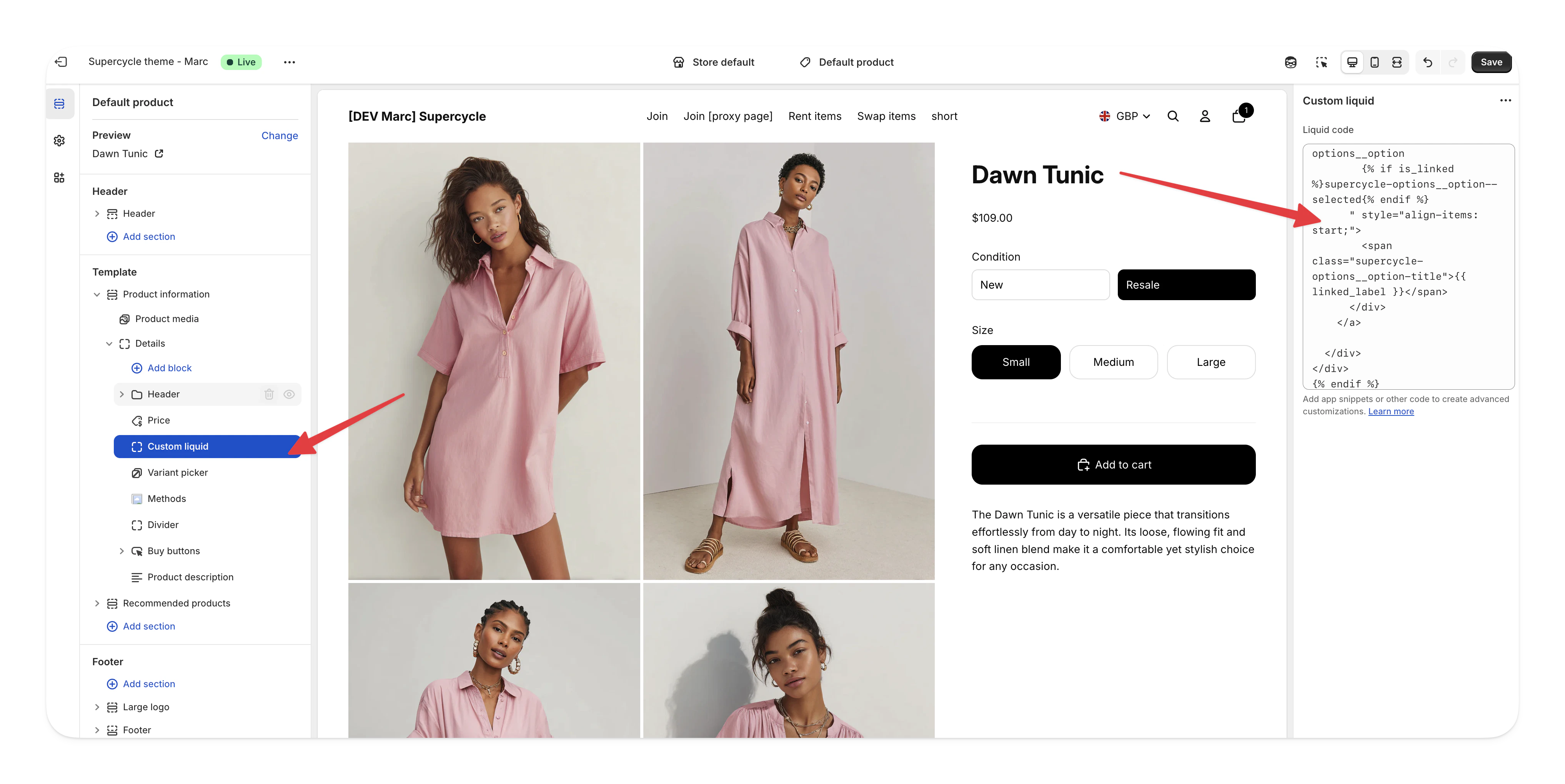
Example of new and resale product switcher on a product page

Prerequisites

  • A Shopify product for the new item (e.g t-shirt)
  • A separate Shopify product setup with Supercycle with a suffix (e.g t-shirt-circular)

How it works

The code uses product handle naming conventions to automatically link products:
  • Base product: t-shirt (new product from Shopify)
  • Linked product: t-shirt-circular (product with circular methods via Supercycle)
When a customer views either product, they see a switcher that lets them toggle between the new and circular versions.

Add the code to your theme

1

Add the Liquid code

Add a Custom Liquid block to your product page in the theme editor:
  1. Go to Online Store > Themes in your Shopify admin
  2. Click Customize on your active theme
  3. Navigate to a product page using the page selector dropdown
  4. In the left sidebar, click Add block in the product information section
  5. Select Custom Liquid from the block options
Shopify theme editor showing Custom Liquid block option
  1. Paste the following code into the Custom Liquid field:
{%- comment -%} Configurable variables {%- endcomment -%}
{% assign new_label = 'New' %}
{% assign linked_label = 'Resale' %}
{% assign linked_suffix = '-resale' %}

{%- comment -%}
  Work out base / linked handles
{%- endcomment -%}
{% assign current = product.handle %}
{% assign base = current | replace: linked_suffix, '' %}

{% assign is_linked = false %}
{% if base != current %}
  {% assign is_linked = true %}
{% endif %}

{% assign linked = base | append: linked_suffix %}

{%- comment -%} Look up products {%- endcomment -%}
{% assign base_product = all_products[base] %}
{% assign linked_product = all_products[linked] %}

{%- comment -%}
  Only show switcher when:
  - linked_suffix is not blank
  - base product exists
  - linked product exists and is a real product
{%- endcomment -%}
{% if linked_suffix != blank and base_product and linked_product and linked_product.title != blank %}
<div class="supercycle-options">
  <label class="supercycle-options__label form__label">Condition</label>

  <div class="supercycle-options__container">

    {%- comment -%} Base option (no suffix) {%- endcomment -%}
    <a href="{{ base_product.url }}" class="supercycle-options__option-link">
      <div class="
        supercycle-options__option
        {% unless is_linked %}supercycle-options__option--selected{% endunless %}
      " style="align-items: start;">
        <span class="supercycle-options__option-title">{{ new_label }}</span>
      </div>
    </a>

    {%- comment -%} Linked option (with suffix) {%- endcomment -%}
    <a href="{{ linked_product.url }}" class="supercycle-options__option-link">
      <div class="
        supercycle-options__option
        {% if is_linked %}supercycle-options__option--selected{% endif %}
      " style="align-items: start;">
        <span class="supercycle-options__option-title">{{ linked_label }}</span>
      </div>
    </a>

  </div>
</div>
{% endif %}
2

Configure the variables

Update these variables to match your setup:
{% assign new_label = 'New' %}
{% assign linked_label = 'Resale' %}
{% assign linked_suffix = '-circular' %}
VariableDescriptionExamples
new_labelLabel shown for the new product option.New, Buy New
linked_labelLabel shown for the Supercycle product option.Resale, Rental, Circular, Buy refurbished
linked_suffixSuffix added to the base product handle to identify the Supercycle version.-circular, -resale, -rental
3

Style the switcher

The switcher uses the same classes as the Supercycle methods app block.
The switcher only appears when both the base product and the linked Supercycle product exist. If either product is missing, the switcher won’t display.