> ## Documentation Index
> Fetch the complete documentation index at: https://docs.supercycle.com/llms.txt
> Use this file to discover all available pages before exploring further.
# Returns overview
> Receive and process returned items from customers
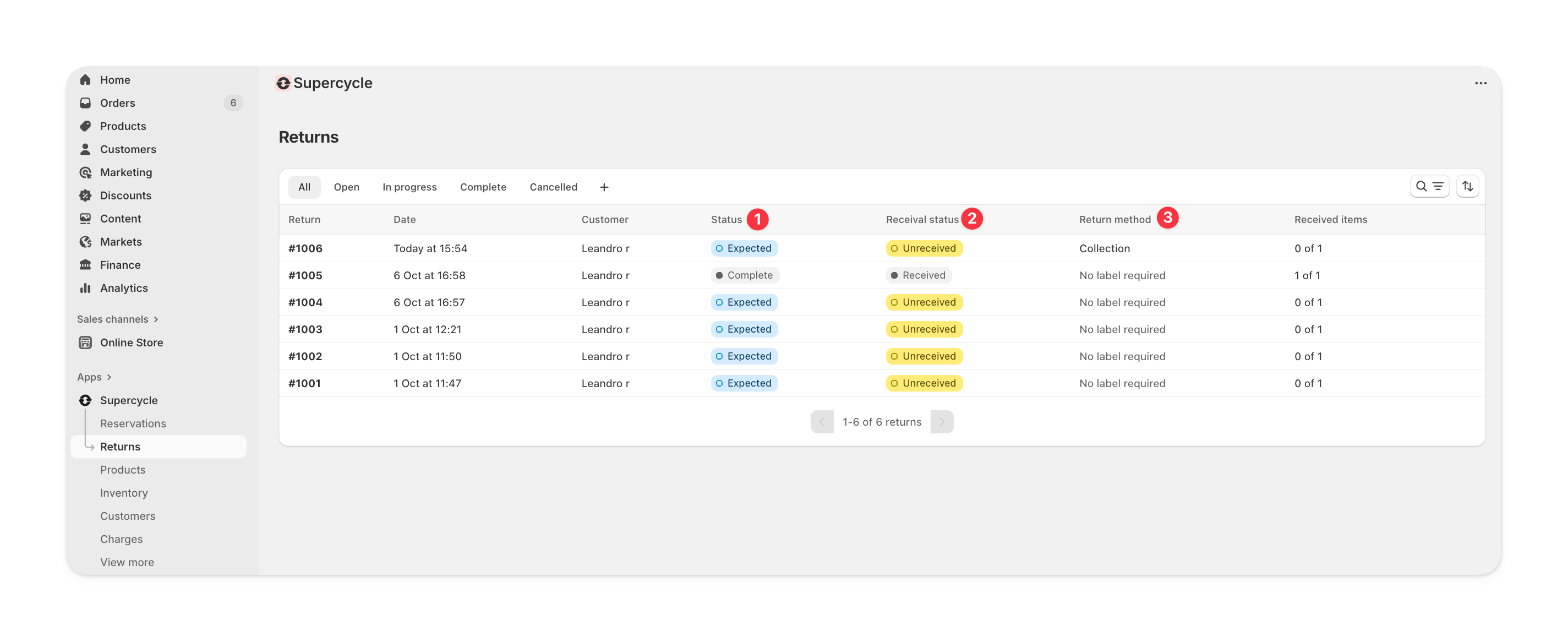
Returns can be initiated by the customer through the **customer portal** or manually from the **Returns** section in the Supercycle admin.
A single return can include multiple items across different rentals.
 ***
## Return statuses
A **return status** shows the overall stage of a return. This status updates automatically as you or the customer take actions.
| Return status | Description |
| ------------- | ---------------------------------------------------------------------------- |
| `Requested` | The customer has asked to return items and is awaiting approval if required. |
| `Expected` | The return has been approved, and you’re waiting to receive items. |
| `In progress` | Some items have been received, but not all. |
| `Received` | All items in the return have been received. |
| `Completed` | The return is fully processed — items received, deposits or credits handled. |
| `Cancelled` | The return has been cancelled. |
***
## Receival status
A **receival status** summarizes how many items in the return have been received. It’s automatically derived from the return line statuses.
| Receival status | Description |
| -------------------- | -------------------------------------------- |
| `Unreceived` | No items in the return have been received. |
| `Partially received` | Some items in the return have been received. |
| `Received` | All items in the return have been received. |
***
## Return methods
A **return method** defines how the customer is returning their items.\
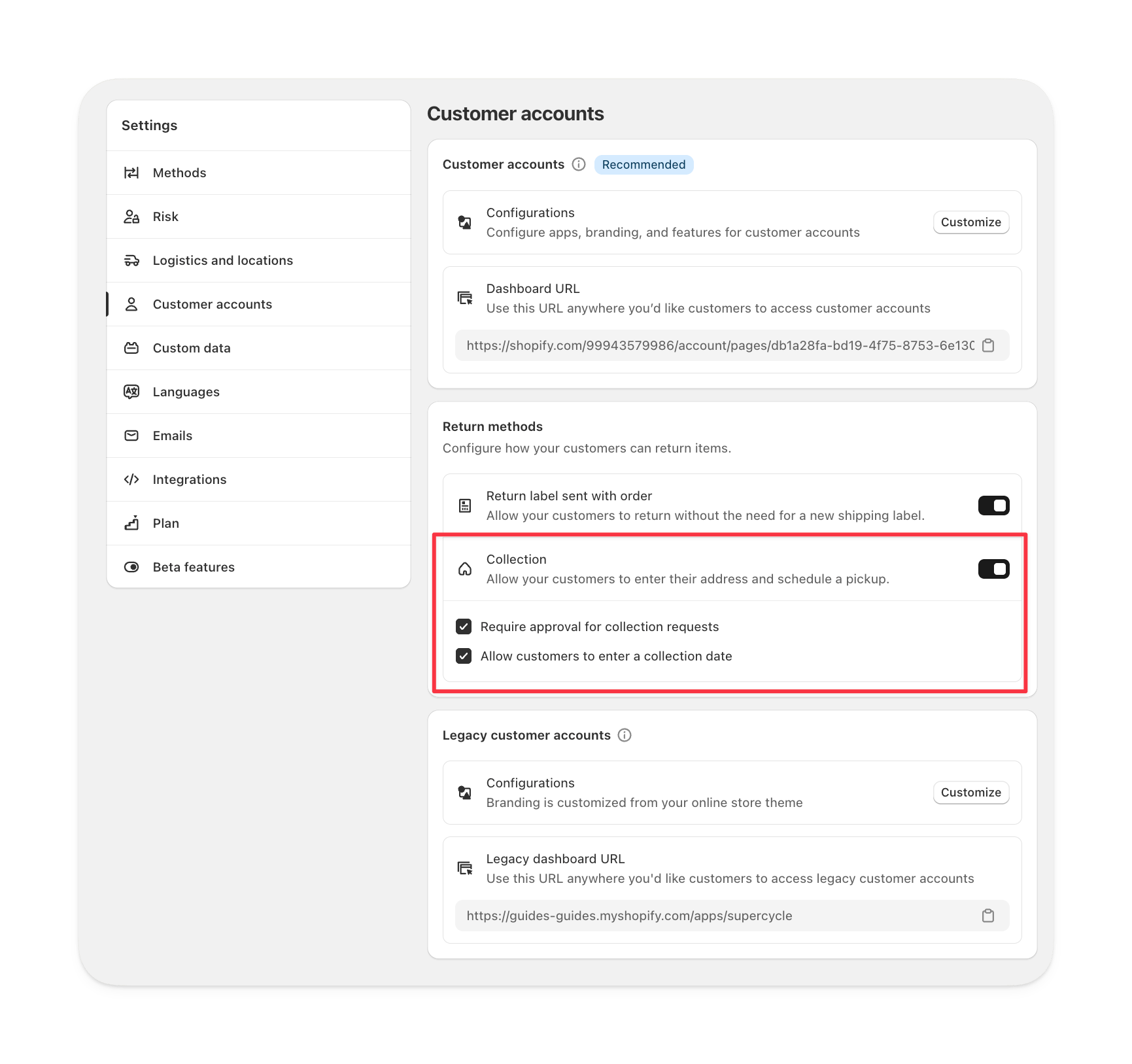
You can configure which return methods are available in **Supercycle > Settings > Customer portal** settings.
### Collection
The **collection** method allows customers to schedule a home pickup for their return.\
It includes the customer’s address and a chosen collection date.
***
## Return statuses
A **return status** shows the overall stage of a return. This status updates automatically as you or the customer take actions.
| Return status | Description |
| ------------- | ---------------------------------------------------------------------------- |
| `Requested` | The customer has asked to return items and is awaiting approval if required. |
| `Expected` | The return has been approved, and you’re waiting to receive items. |
| `In progress` | Some items have been received, but not all. |
| `Received` | All items in the return have been received. |
| `Completed` | The return is fully processed — items received, deposits or credits handled. |
| `Cancelled` | The return has been cancelled. |
***
## Receival status
A **receival status** summarizes how many items in the return have been received. It’s automatically derived from the return line statuses.
| Receival status | Description |
| -------------------- | -------------------------------------------- |
| `Unreceived` | No items in the return have been received. |
| `Partially received` | Some items in the return have been received. |
| `Received` | All items in the return have been received. |
***
## Return methods
A **return method** defines how the customer is returning their items.\
You can configure which return methods are available in **Supercycle > Settings > Customer portal** settings.
### Collection
The **collection** method allows customers to schedule a home pickup for their return.\
It includes the customer’s address and a chosen collection date.
 ### Return label
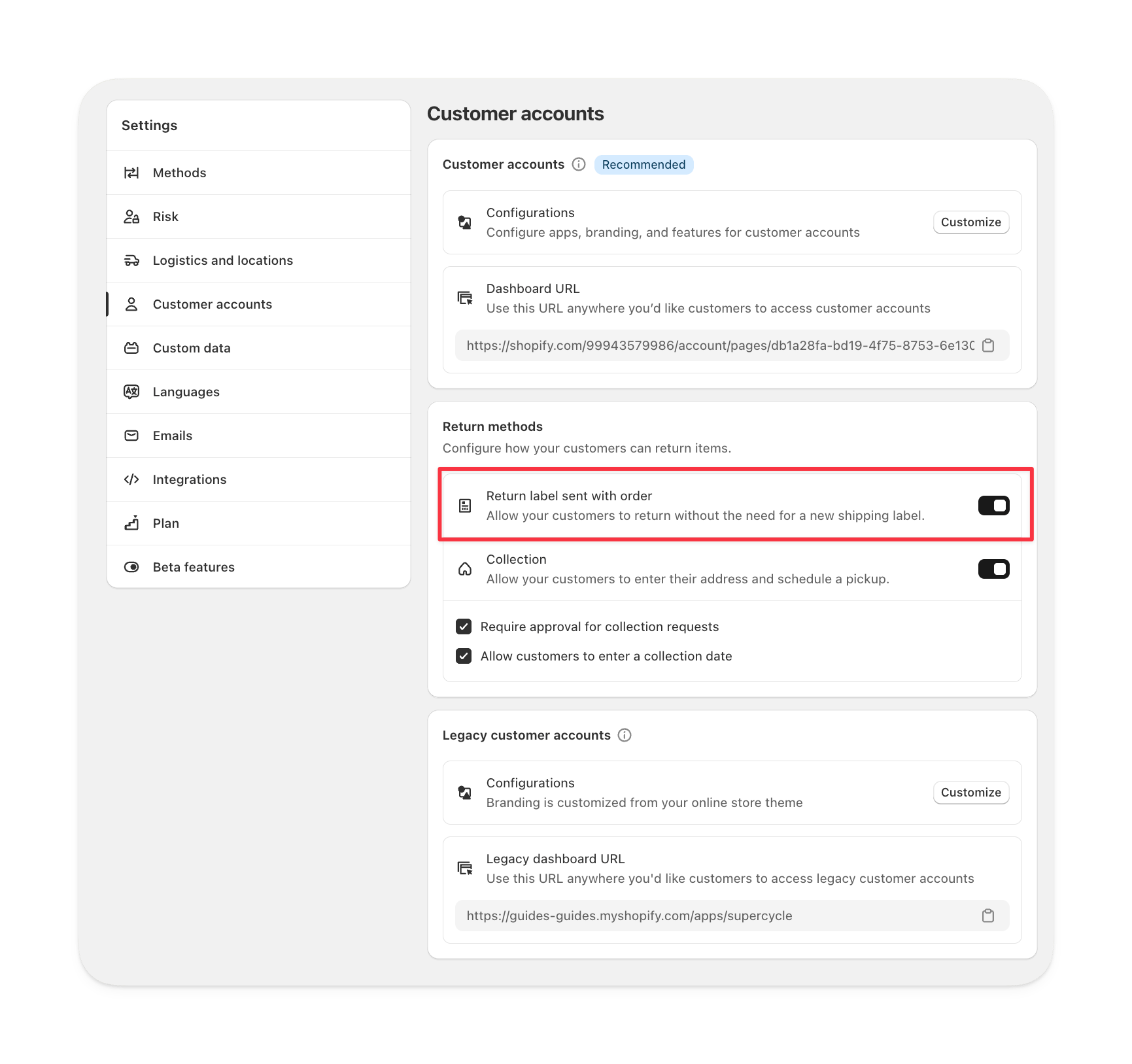
The **return label** method provides a shipping label the customer can use to send items back.\
Tracking details and courier information are shown once the label is created.
### Return label
The **return label** method provides a shipping label the customer can use to send items back.\
Tracking details and courier information are shown once the label is created.
 ### Customer portal view
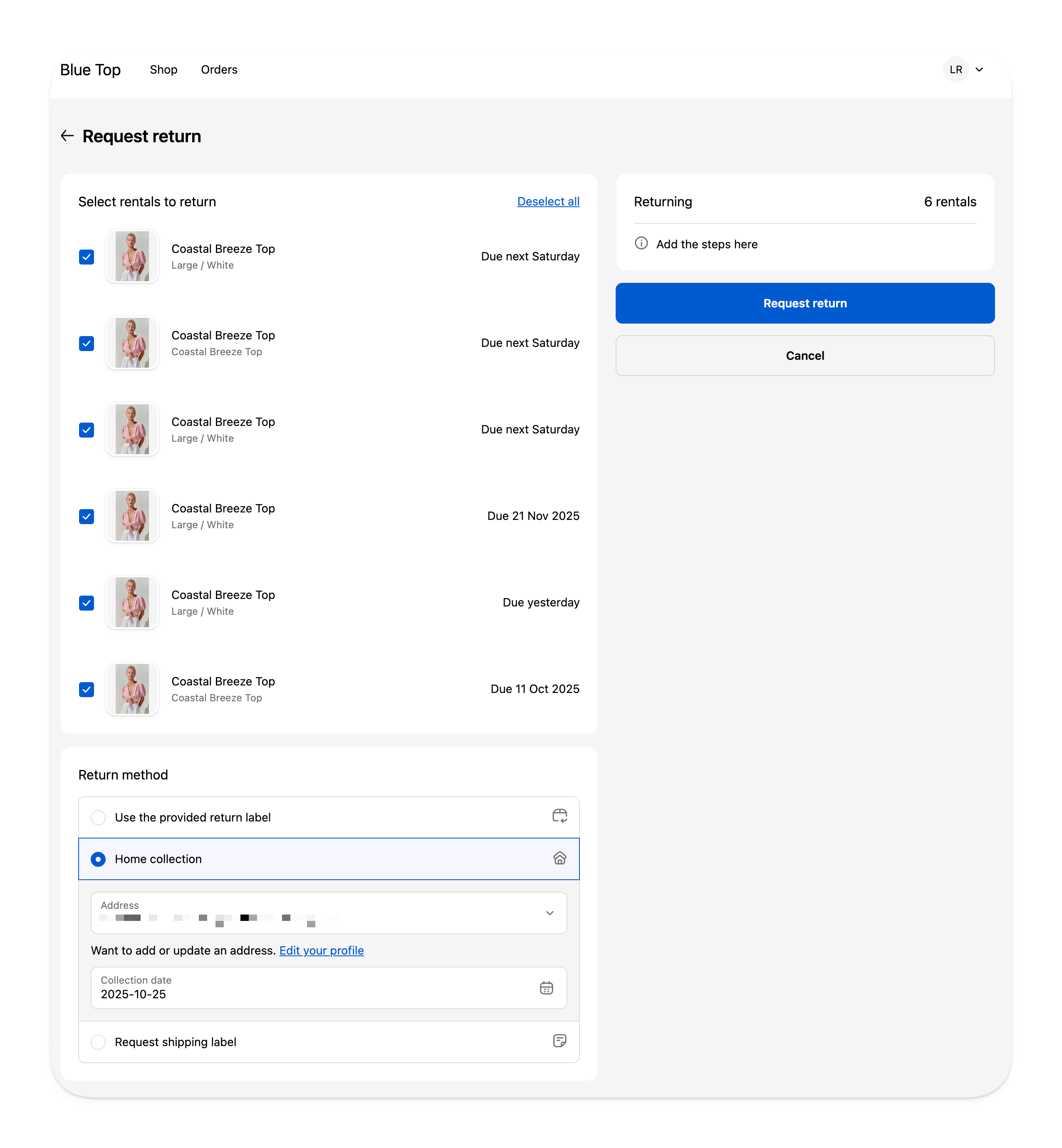
This is how return methods appear to customers in the portal.\
They choose a method, enter any required details, and confirm the return.
### Customer portal view
This is how return methods appear to customers in the portal.\
They choose a method, enter any required details, and confirm the return.
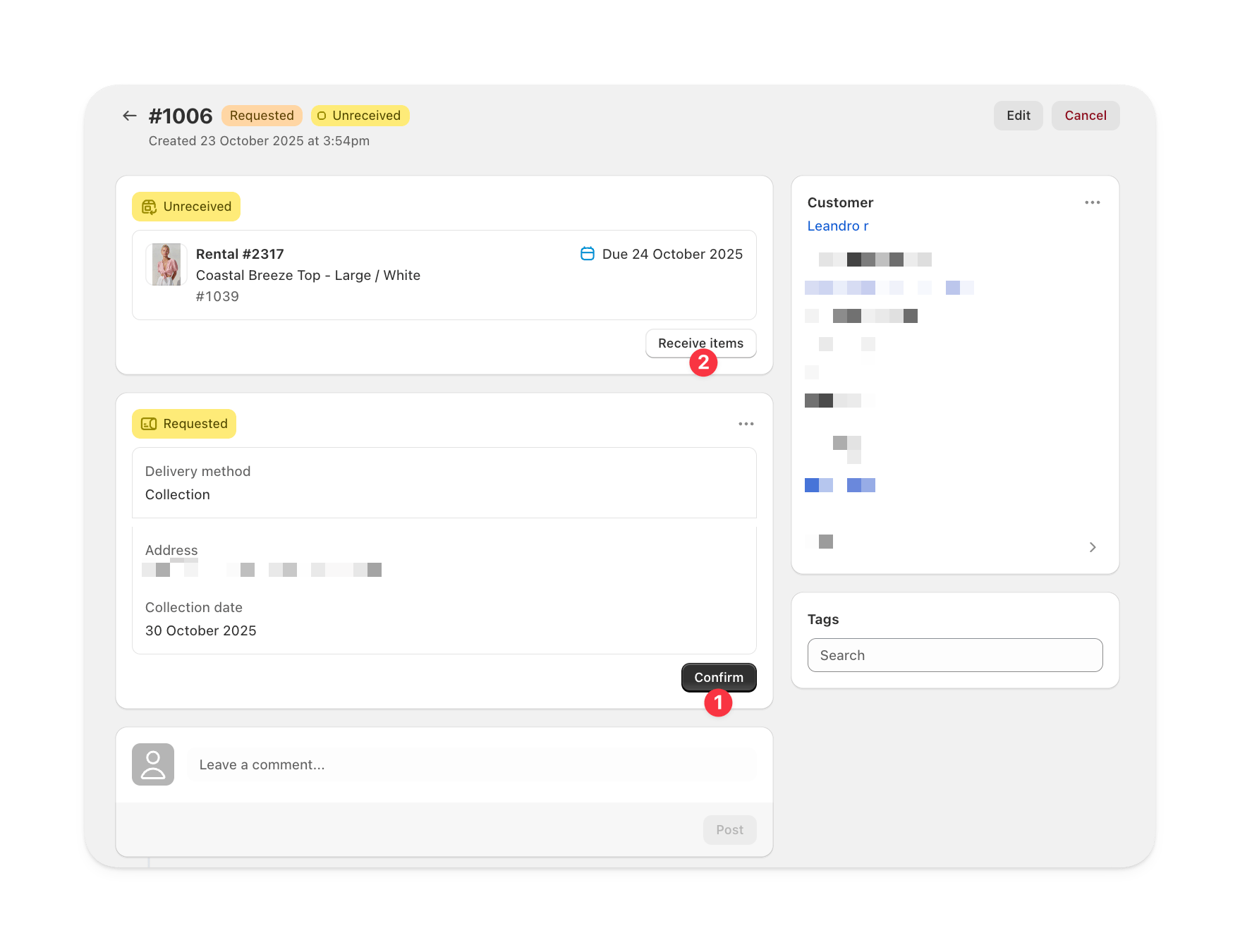
 ### Admin view
Once a customer submits a return, you can review and manage it from **Supercycle > Returns > \[Return ID]**.\
This view lets you confirm collection details, update item statuses, and mark items as received.
In the admin view:
**Confirm collection details**: approve or verify the address and collection date provided by the customer.\
**Receive items**: mark items as received once they arrive, updating both the return line and overall receival statuses automatically.
### Admin view
Once a customer submits a return, you can review and manage it from **Supercycle > Returns > \[Return ID]**.\
This view lets you confirm collection details, update item statuses, and mark items as received.
In the admin view:
**Confirm collection details**: approve or verify the address and collection date provided by the customer.\
**Receive items**: mark items as received once they arrive, updating both the return line and overall receival statuses automatically.
 ***
## Return FAQs
Returns in Supercycle are currently separate from Shopify’s native return system.
Yes. If multiple return methods are enabled, customers can select one when starting a return in the portal.
***
## Return FAQs
Returns in Supercycle are currently separate from Shopify’s native return system.
Yes. If multiple return methods are enabled, customers can select one when starting a return in the portal.