> ## Documentation Index
> Fetch the complete documentation index at: https://docs.supercycle.com/llms.txt
> Use this file to discover all available pages before exploring further.
# Product actions
> Updating products and method pricing options
### Add a product
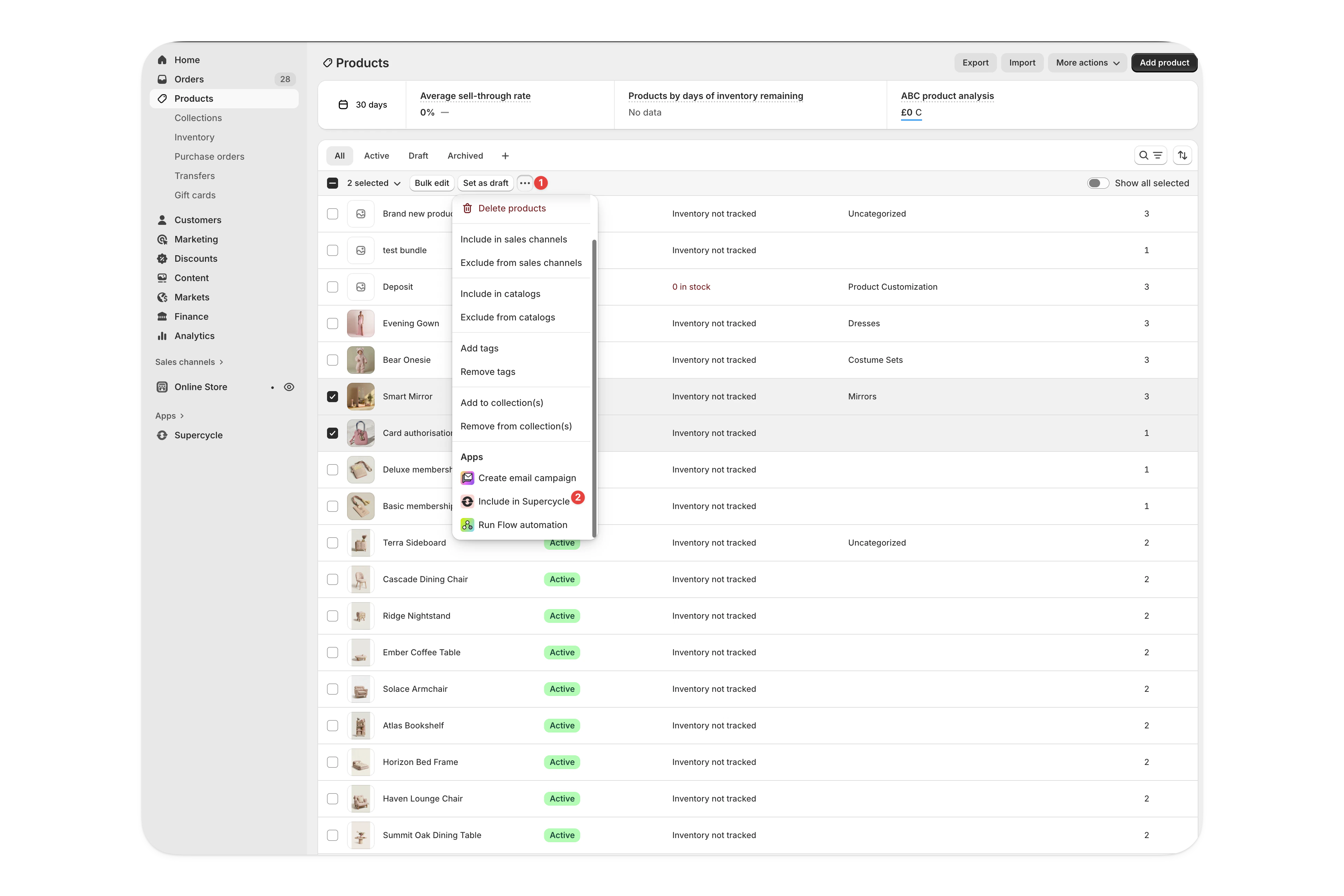
In Shopify Admin, head to [**Products**](https://admin.shopify.com/store/products/).
In the products table, **select the products** you want to import, **more actions** and then **Include in Supercycle** .
Products imported will have inventory set to 'Inventory not tracked' within Shopify and Supercycle will take over inventory management.
Review the products you are about to import and confirm by clicking **Import**.
### Bulk update method options
In your Shopify admin, go to **Supercycle** > **Products**.
Select the products you want to update method options for.
Click the **•••** menu and select **Bulk update options**.
Select the rental method (Calendar, Membership, Subscription, or Resale) you want to create or update options for.
Download the CSV template to see the required format and fields.
Complete the CSV with your option details. You can use Liquid templating for dynamic values.
Upload your completed CSV file and click **Import** to create or update the options.
You can also use [Liquid formulas](/documentation/manage/products/managing-method-options) to update existing options in bulk without CSV import. This is useful for applying consistent changes like price increases across multiple options.