> ## Documentation Index
> Fetch the complete documentation index at: https://docs.supercycle.com/llms.txt
> Use this file to discover all available pages before exploring further.
# Consignors
> Add and manage the brand partners whose stock you sell.
A **consignor** is the brand partner, supplier, or person who owns stock you sell on their behalf. Each consignor has a default revenue share, an optional linked customer, and one or more payout methods.
Find your consignors in Shopify admin under **Supercycle** > [**Consignors**](https://admin.shopify.com/apps/supercycle/consignors), or via **Settings** > **Consignment** > **Manage consignors**.
***
## The consignors list
The consignors table shows every consignor and the key numbers at a glance.
| Column | Description |
| --------------- | -------------------------------------------------------------- |
| `Consignor` | The consignor's name. Links to their detail page. |
| `Customer` | The linked Shopify customer, if any. |
| `Revenue share` | The consignor's default share of net revenue, as a percentage. |
| `Items` | How many items are assigned to the consignor. |
| `Balance owed` | The amount you've accrued but not yet paid out. |
| `Status` | `Active` or `Archived`. |
Use the **All**, **Active**, and **Archived** tabs to filter by status, search by name, and sort by name or created date. Select **Export** to download the list as a CSV.
***
## Add a consignor
In Shopify admin, go to **Supercycle** > [**Consignors**](https://admin.shopify.com/apps/supercycle/consignors). You can also reach this from **Settings** > **Consignment** > **Manage consignors**.
Select **Add consignor**.
Give the consignor a **Name** (their brand or partner name), optionally link a **Customer**, and set their **Revenue share**, the percentage of net revenue from their items that they keep.
Select **Create consignor**. You can add **Payout methods** and edit the consignor's details from their page afterwards.
***
## Payout methods
Each consignor can have its own payout details, configured on their page. Turn on the methods you'll use for that consignor.
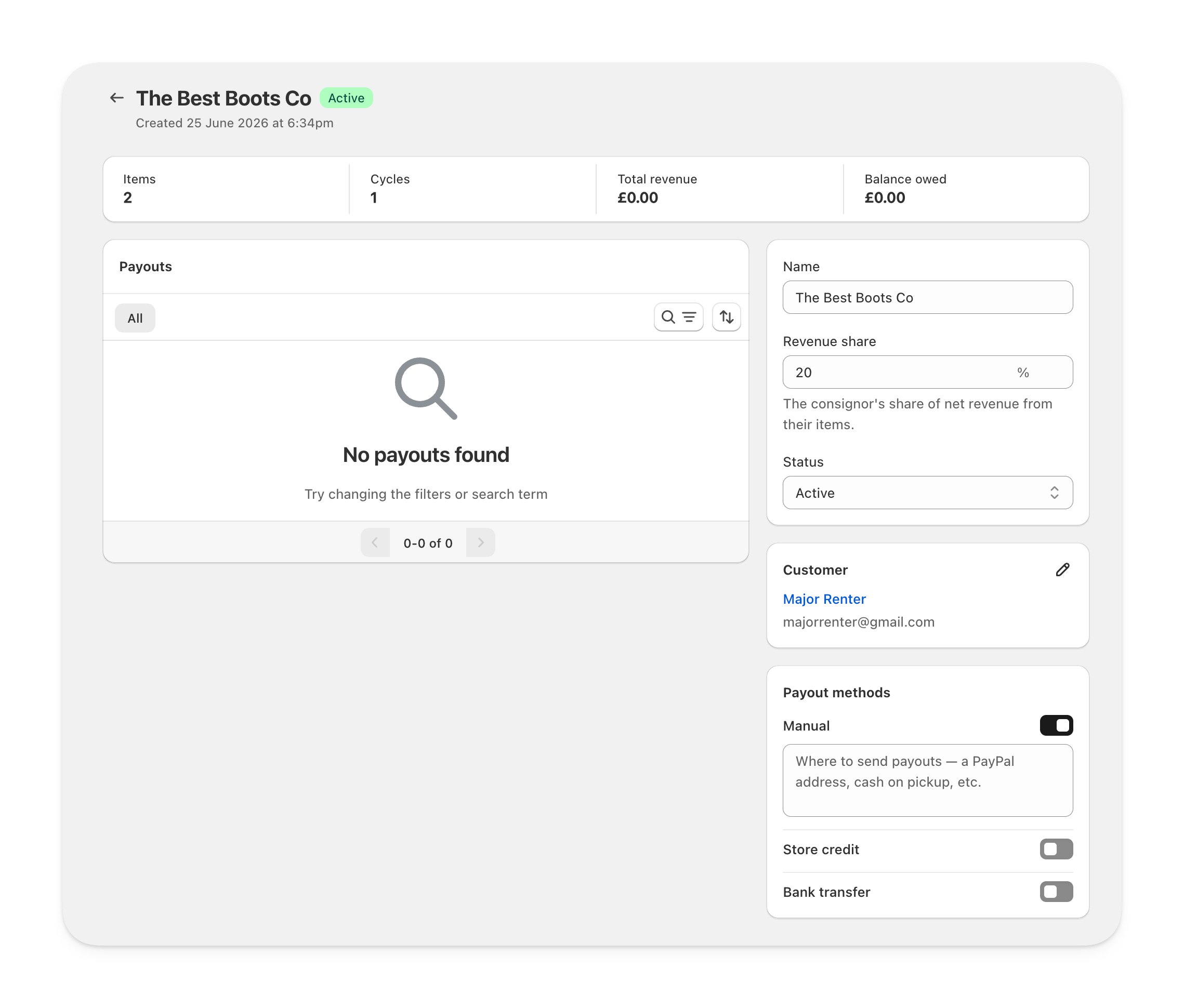 Record payouts you make outside Supercycle. Add **Payment instructions** so anyone recording a payout knows where to send it: a PayPal address, cash on pickup, and so on.
Coming soon. Pays the consignor with credit to spend in your store. The consignor must have a linked **Customer** to receive store credit.
Coming soon. Stores the consignor's **Account holder**, **Bank name**, **Account number**, and **Routing number** (sort code, routing number, or BSB). Bank details are encrypted.
Only **Manual** payouts can be recorded today. **Store credit** and **Bank transfer** are shown so you can prepare details ahead of launch.
***
## Archive a consignor
Set a consignor's **Status** to `Archived` to hide them from your active list, for example when a partnership ends. You can also **Archive consignors** in bulk from the consignors list.
Archiving is reversible (**Unarchive consignors**) and non-destructive:
* Past earnings, refunds, and payouts are kept.
* Any outstanding balance remains payable. Archived consignors with a balance still appear when recording payouts.
* Items stay assigned to the consignor.
***
## Custom fields
You can add **custom field definitions** for consignors to store extra information, such as a tax ID or contract reference. Set these up under **Settings** > **Custom data**. See [Custom data](/documentation/configuration/custom-data/custom-fields) for more.
Record payouts you make outside Supercycle. Add **Payment instructions** so anyone recording a payout knows where to send it: a PayPal address, cash on pickup, and so on.
Coming soon. Pays the consignor with credit to spend in your store. The consignor must have a linked **Customer** to receive store credit.
Coming soon. Stores the consignor's **Account holder**, **Bank name**, **Account number**, and **Routing number** (sort code, routing number, or BSB). Bank details are encrypted.
Only **Manual** payouts can be recorded today. **Store credit** and **Bank transfer** are shown so you can prepare details ahead of launch.
***
## Archive a consignor
Set a consignor's **Status** to `Archived` to hide them from your active list, for example when a partnership ends. You can also **Archive consignors** in bulk from the consignors list.
Archiving is reversible (**Unarchive consignors**) and non-destructive:
* Past earnings, refunds, and payouts are kept.
* Any outstanding balance remains payable. Archived consignors with a balance still appear when recording payouts.
* Items stay assigned to the consignor.
***
## Custom fields
You can add **custom field definitions** for consignors to store extra information, such as a tax ID or contract reference. Set these up under **Settings** > **Custom data**. See [Custom data](/documentation/configuration/custom-data/custom-fields) for more.