> ## Documentation Index
> Fetch the complete documentation index at: https://docs.supercycle.com/llms.txt
> Use this file to discover all available pages before exploring further.
# Dunning
> Automated payment retry system for failed subscription billing
The dunning process is an automated payment retry system that handles failed subscription billing attempts. When a payment fails, the system creates a dunning record that manages the retry logic, tracking payment attempts and determining when to retry based on configurable shop settings.
## What triggers dunning
Dunning is triggered when a recurring billing attempt fails. Supercycle creates billing attempts for recurring charges, and if Shopify cannot process the payment, dunning automatically begins. Learn more in [Payment attempts](https://docs.supercycle.com/documentation/manage/charges/payments).
## Which methods it applies to
Dunning applies to subscription-based billing:
* **Subscriptions**
* **Membership**
## Viewing dunning status
You can view dunning information in the charges detail page.
Navigate to **Supercycle** > **Charges** > click on a specific charge to view the dunning banner.
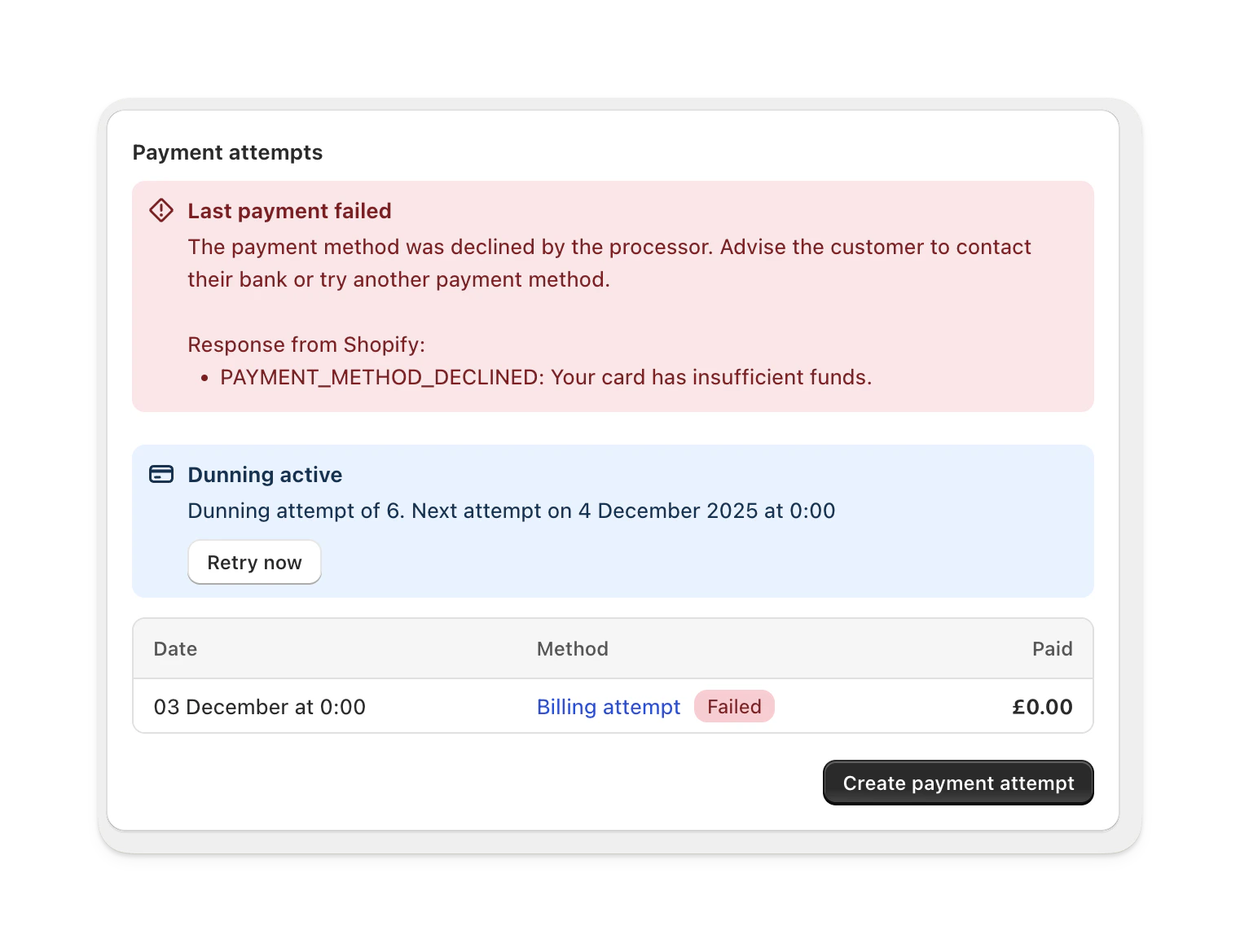 The charge detail page displays:
* Dunning status (active, failed, cancelled, or complete)
* Current retry attempt count out of maximum attempts
* Next scheduled retry date and time
* Manual "Retry now" button option
## Configure dunning settings
Navigate to **Settings** > **Risk** > **Dunning** section.
The charge detail page displays:
* Dunning status (active, failed, cancelled, or complete)
* Current retry attempt count out of maximum attempts
* Next scheduled retry date and time
* Manual "Retry now" button option
## Configure dunning settings
Navigate to **Settings** > **Risk** > **Dunning** section.
 The configuration page allows adjusting:
| Setting | Default | Description |
| -------------------- | ------- | ----------------------------------- |
| Maximum retries | 3 | Total number of retry attempts |
| Time between retries | 2 | The interval value between attempts |
| Retry unit | Days | Hours or Days |
Email templates are controlled separately via customer email settings and cannot be customized per-dunning instance. The failed charge email is enabled/disabled globally.
## Manual retry
You can manually retry a payment from the charge detail page:
Go to the charge with failed dunning status.
Click the **Retry now** button in the dunning banner.
Confirm in the modal dialog. The system immediately creates a new billing attempt, bypassing the retry interval.
The configuration page allows adjusting:
| Setting | Default | Description |
| -------------------- | ------- | ----------------------------------- |
| Maximum retries | 3 | Total number of retry attempts |
| Time between retries | 2 | The interval value between attempts |
| Retry unit | Days | Hours or Days |
Email templates are controlled separately via customer email settings and cannot be customized per-dunning instance. The failed charge email is enabled/disabled globally.
## Manual retry
You can manually retry a payment from the charge detail page:
Go to the charge with failed dunning status.
Click the **Retry now** button in the dunning banner.
Confirm in the modal dialog. The system immediately creates a new billing attempt, bypassing the retry interval.
 ## Shopify Flow integration
The **Payment collection failed** Flow trigger fires when a payment collector exhausts its retries without successfully capturing payment. Use it to send notifications, update subscriptions, or take other custom action when collection fails.
You can also pair it with the **Create payment attempt** Flow action to programmatically retry billing on a charge from inside a workflow — for example, to schedule a delayed retry or to retry once a downstream system signals the customer has updated their payment method. Learn more in [Available actions](/documentation/manage/automation/automation#available-actions) and [Create a workflow](/documentation/manage/automation/create-workflow).
## Common error codes
| Error code | Message | Solution |
| ------------------------------- | ----------------------------------------------- | ----------------------------------------------------- |
| `expired_payment_method` | The customer's payment method has expired | Request updated payment method |
| `payment_method_declined` | Payment method declined by processor | Advise customer to contact bank or try another method |
| `payment_method_not_found` | No active payment method found | Ensure customer has valid payment method on file |
| `buyer_canceled_payment_method` | Customer canceled their payment method | Ask customer to update payment details |
| `insufficient_funds` | Shown as declined | Advise retry later |
| `authentication_error` | Authentication failed during payment processing | Ensure customer payment details are correct and retry |
## Limits and constraints
**Automatic retry conditions:**
* Retries only occur if no pending payment exists
* Retries respect the configured interval since last failed attempt
* Retries stop after max attempts reached
* Manual retry bypasses interval check but still respects max attempts logic
**Dunning cancellation:**
* If the associated charge is cancelled, dunning is automatically cancelled
* Cancelled dunning will not create new payment attempts
## Shopify Flow integration
The **Payment collection failed** Flow trigger fires when a payment collector exhausts its retries without successfully capturing payment. Use it to send notifications, update subscriptions, or take other custom action when collection fails.
You can also pair it with the **Create payment attempt** Flow action to programmatically retry billing on a charge from inside a workflow — for example, to schedule a delayed retry or to retry once a downstream system signals the customer has updated their payment method. Learn more in [Available actions](/documentation/manage/automation/automation#available-actions) and [Create a workflow](/documentation/manage/automation/create-workflow).
## Common error codes
| Error code | Message | Solution |
| ------------------------------- | ----------------------------------------------- | ----------------------------------------------------- |
| `expired_payment_method` | The customer's payment method has expired | Request updated payment method |
| `payment_method_declined` | Payment method declined by processor | Advise customer to contact bank or try another method |
| `payment_method_not_found` | No active payment method found | Ensure customer has valid payment method on file |
| `buyer_canceled_payment_method` | Customer canceled their payment method | Ask customer to update payment details |
| `insufficient_funds` | Shown as declined | Advise retry later |
| `authentication_error` | Authentication failed during payment processing | Ensure customer payment details are correct and retry |
## Limits and constraints
**Automatic retry conditions:**
* Retries only occur if no pending payment exists
* Retries respect the configured interval since last failed attempt
* Retries stop after max attempts reached
* Manual retry bypasses interval check but still respects max attempts logic
**Dunning cancellation:**
* If the associated charge is cancelled, dunning is automatically cancelled
* Cancelled dunning will not create new payment attempts