> ## Documentation Index
> Fetch the complete documentation index at: https://docs.supercycle.com/llms.txt
> Use this file to discover all available pages before exploring further.
# Charges overview
> Record of charges for usage of product.
* A charge is the record of the payment due for the usage of a product.
* A charge may have multiple [payment attempts](/documentation/manage/charges/payments).
Charges are accessed from [Charges](https://admin.shopify.com/apps/supercycle/charges)
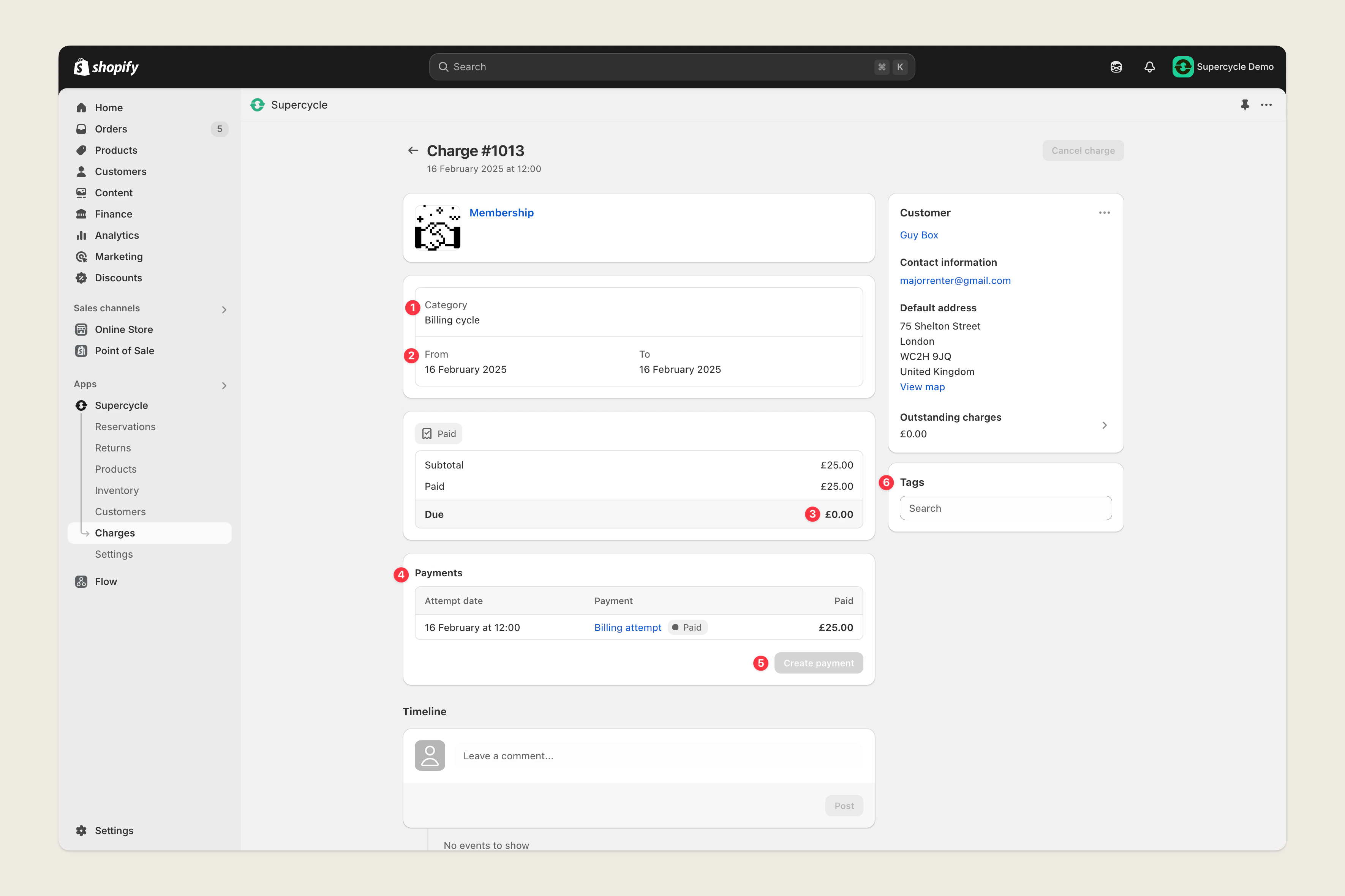 ***
#### Charge category
| Category | Description |
| ------------- | ---------------------------------------------------- |
| Checkout | An initial checkout for a rental or membership. |
| Billing cycle | A recurring charge for a membership or subscription. |
***
#### Charge period
The period of time the charge covers.
***
#### Balance due
Remaining balance owed for the charge.
***
#### Associated payments
Payment attempts made against the charge.
Includes the status of the payment.
| Status | Description |
| --------- | ------------------------------------------------- |
| `Pending` | Waiting for payment. |
| `Failed` | Multiple payment attempts have been unsuccessful. |
| `Paid` | Payment has been successfully collected. |
***
#### Collect payment
Options to capture payment against the charge.
***
#### Tags
Freeform tags added to the charge.
Often used for tracking progress on collecting overdue payments.
***
## Charge FAQs
All orders will have a corresponding charge, but not all charges will have a corresponding order. In a situation where payment attempts haven't been successful, there will be a `Pending` or `Failed` charge, once payment has been captured and order will be created and connected to the charge.
***
#### Charge category
| Category | Description |
| ------------- | ---------------------------------------------------- |
| Checkout | An initial checkout for a rental or membership. |
| Billing cycle | A recurring charge for a membership or subscription. |
***
#### Charge period
The period of time the charge covers.
***
#### Balance due
Remaining balance owed for the charge.
***
#### Associated payments
Payment attempts made against the charge.
Includes the status of the payment.
| Status | Description |
| --------- | ------------------------------------------------- |
| `Pending` | Waiting for payment. |
| `Failed` | Multiple payment attempts have been unsuccessful. |
| `Paid` | Payment has been successfully collected. |
***
#### Collect payment
Options to capture payment against the charge.
***
#### Tags
Freeform tags added to the charge.
Often used for tracking progress on collecting overdue payments.
***
## Charge FAQs
All orders will have a corresponding charge, but not all charges will have a corresponding order. In a situation where payment attempts haven't been successful, there will be a `Pending` or `Failed` charge, once payment has been captured and order will be created and connected to the charge.